POSMI · Cafés & bistros
From breakfast to afternoon coffee, the menu runs itself.
POSMI shows each menu at its time, lets tables order without waiting and suggests the croissant with the coffee. You run the floor. Free forever.
- Menus by time of day
- Ordering from the table
- More Google reviews
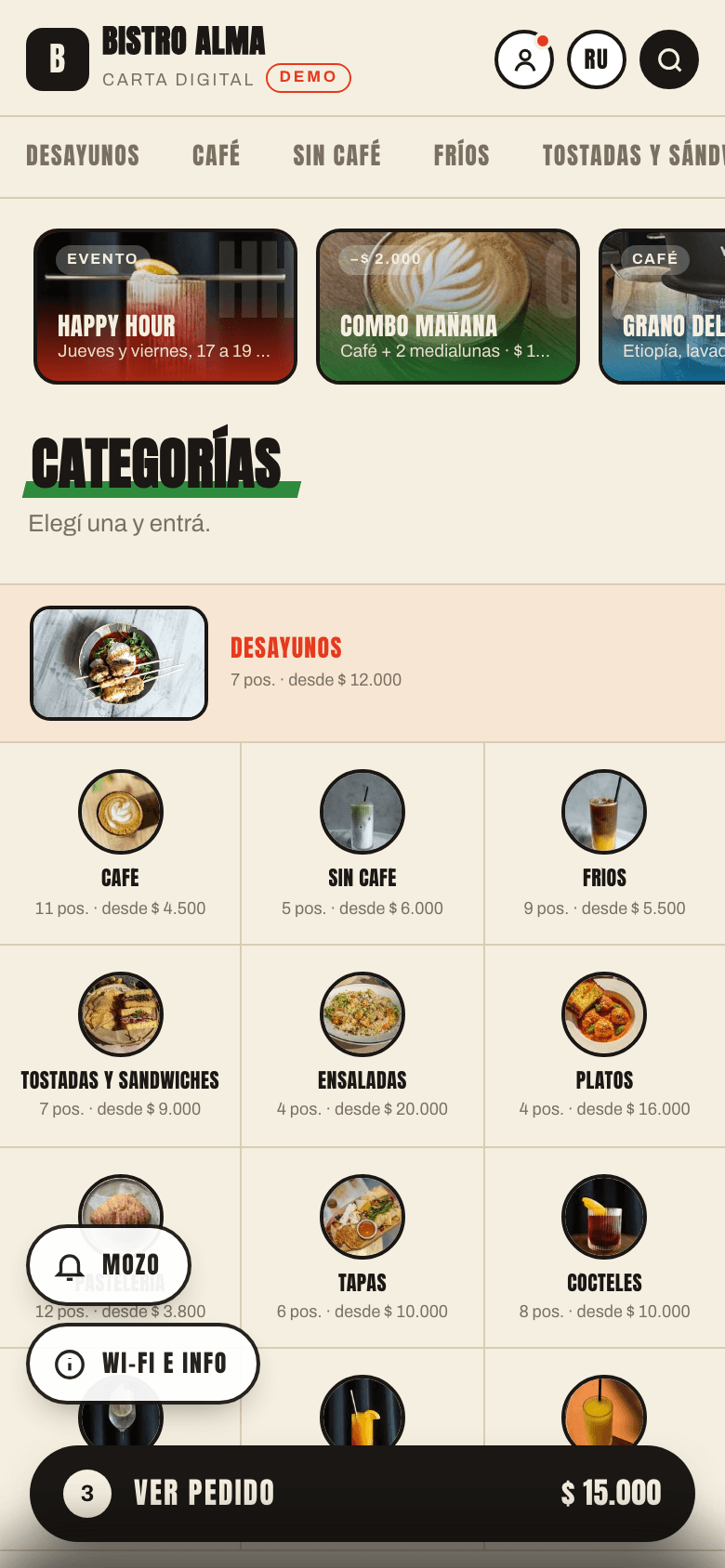
Scan with your phone — it's a real menu
The problem
A day at your café
Three menus, one sheet of paper
Breakfast ends at noon, lunch specials start at 12:30, the afternoon menu at 4. And someone always orders toast at 1.
The window table is waiting
At the lunch rush people have 40 minutes. If they wait to order, they never get to coffee or dessert.
Happy regulars who never leave a review
They come back every week and love it, but on Google the only ones who write are those who had a bad day.
What POSMI does
What POSMI does for your café
Menu, ordering and tables are free. Anything marked as a module is free to try for 1 month.
Menus by time of day
Breakfast, lunch specials and the afternoon menu appear and disappear on their own by day and hour.
Ordering from the table
Guests order when they're ready and add coffee later. Perfect for anyone eating lunch against the clock.
The croissant with the coffee
Each dish suggests its partner: toast with juice, cake with a cortado. The check grows without any pushing.
Vegan, gluten-free, dairy-free
Labels and filters so every guest finds what works for them without asking the server.
A menu for tourists
Translate the menu with one button and tourists read it in their language. Fewer explanations, better orders.
Reviews that lift your rating
Happy guests go straight to Google; complaints reach you privately.
Step by step
A day with POSMI
- 01
8 am, breakfast
The menu opens with breakfast. Guests order from the table and the coffee comes out sooner.
- 02
12:30, lunch specials
The daily menu appears on its own. Those in a hurry order as soon as they sit down.
- 03
4 pm, afternoon treats
The menu switches to afternoon treats and suggests cake with the coffee. Nobody had to change a thing.
- 04
At closing
See what sold most, how much came in through the menu and what your guests wrote.
Try it
Open the menu the way your guests see it
Scan the QR or open the demo: it's a real POSMI menu, with ordering, filters and call-the-server.
Scan with your phone — it's a real menu
Open the demoComing soon: a demo built for your type of venue.
$0
No card, no expiry
Pricing
Start free. Forever.
QR menu, ordering, tables, kitchen and team — unlimited, no card. You only pay for the modules that make you sell more, and you can try each one free for 1 month.
Optional modules: Sales, Reputation and Guests
Frequently asked questions
Can I change the daily special every day?
Yes. Edit dishes and prices from your phone and the menu updates instantly, no reprinting.
Do guests have to sign up to order?
No. At the table they order without leaving any details. If they use POSMI ID, they also collect stamps and points at your café.
Can I have a stamp card?
Yes: join the POSMI network's stamp promos or create your own, with the items, goal and reward you choose.
How much does it cost?
Menu, ordering and tables are free forever. Time-based menus are part of the Sales module and Google reviews are part of Reputation. Each is free to try for 1 month.
Free, really? Where's the catch?
What's free is the floor work: the menu, orders, tables and QR codes, with no limits and no card. We charge only for the modules that grow revenue, and we show that growth in numbers.
Sign up
Register your restaurant
Leave your details and we'll message you on WhatsApp to activate your account. Free, no commitment.
Message us on WhatsAppPOSMI · Cafés & bistros
Your café on autopilot, 8 to 8.
Register your café for free and upload your menu in minutes with POSMI's AI.
Register my restaurantPOSMI is also for
Every format has its own pressure points. See what POSMI does for each one.
- Bars & breweriesRounds from the table when the bar is slammed.
- RestaurantsSteakhouses, family spots and pizzerias: a photo menu and a faster floor.
- Fine diningTechnology you don't see: the service stays human.
- Fast foodBurger joints and pizzerias: shorter lines, combos and bigger checks.
- Specialty coffeeSkip-the-line takeout, the right milk and customers who come back.
- Dark kitchensYour own ordering channel, without app commissions.
- Meal prep & subscriptionsWeekly menu, pre-orders and customers who reorder.
- NightclubsBottles to the VIP table, a faster bar and tonight's event on the menu.
- Shows & eventsStand-up, live music and theater: orders without stopping the show.
- CanteensOffices, universities and factories: daily menu, shorter lines, less waste.